Detailed ChemQuery Architecture
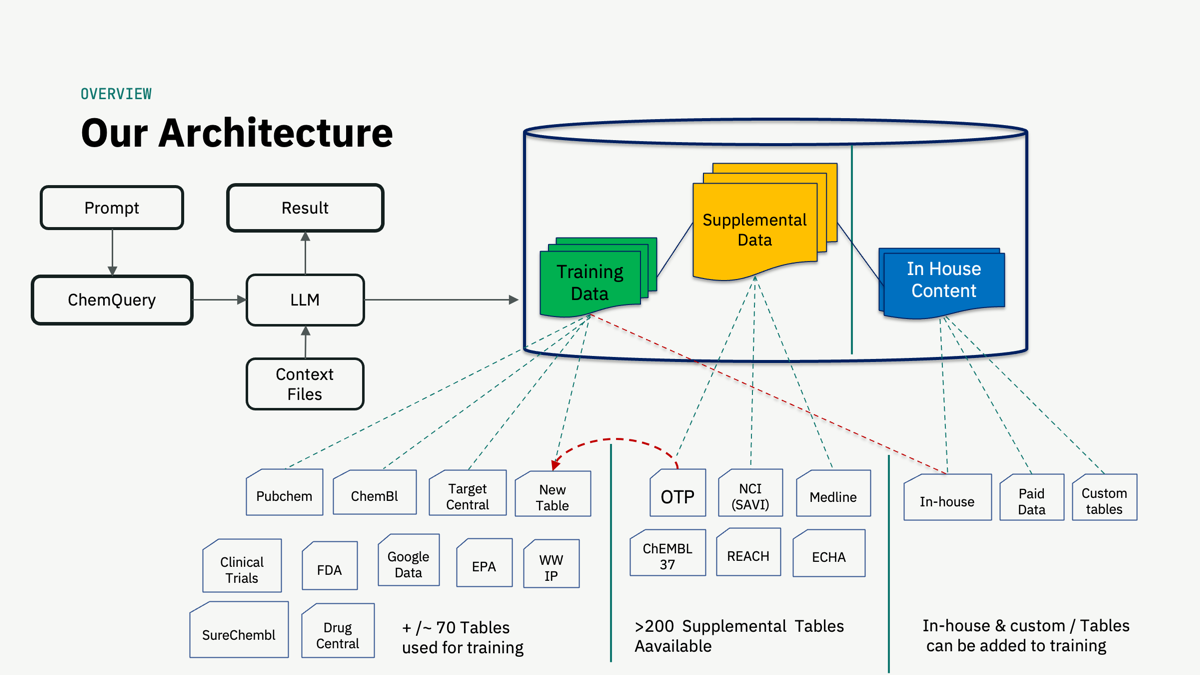
A walkthrough, step by step
Ask a question
A scientist types a prompt into the ChemQuery app. Other applications, such as Scaffold-Lab, ChemAudit, Chemdoc miner, Claude-Science, ChatGPT and Gemini, can send prompts too, through MCP connectivity.
The LLM plans the query
The language model reads the prompt and writes an expert SQL query against the trained data structures. It works in both directions with the database: it consults the tables, then runs the query.
Training tables ground the model
About 70 tables are used for training, including PubChem, ChEMBL, Target Central, clinical trials, FDA, EPA, worldwide IP, SureChEMBL, DrugCentral, and Google data. New tables can be added.
Supplemental tables extend the reach
More than 200 supplemental tables are available, such as OTP, NCI (SAVI), Medline, ChEMBL 37, REACH, and ECHA. They are drawn in when a question needs them.
In-house content stays yours
In-house tables, paid data, and custom tables sit in their own area of the database. They can be added to training so the model learns their structure.
The result comes back
The query runs in the BigQuery database, and the LLM returns the result to the app as data, counts, and tables you can inspect.
Curated foundations
Normalized scientific datasets and cross-source relationships support questions that span disciplines.
Supplemental data
Specialized tables and additional sources extend the questions the platform can address.
Enterprise data
Customer-owned information may be incorporated under an agreed integration and access model.